Private and Secure AI: What It Means and How to Verify
Learn what private and secure AI means, including data handling, retention, encryption and deployment controls, and how to check each claim.
People often judge whether an AI tool is safe by asking two questions: does the vendor train models on my prompts, and can I delete my chat history? Those two checks feel reassuring, yet they leave the largest source of workplace data exposure untouched.
Even when an assistant never trains on your files and keeps zero copies in the cloud, over-broad folder permissions and careless output sharing can still leak payroll records, legal drafts, or client contracts in seconds. Treating AI safety as a checkbox on a privacy policy misses how real breaches happen.
Building or buying a private and secure AI setup requires looking past vendor slogans and testing five separate technical controls. Once you understand what each control covers, and where each one stops, you can run a straightforward set of verification tests and hold any vendor to the results.
What Private and Secure AI Actually Means
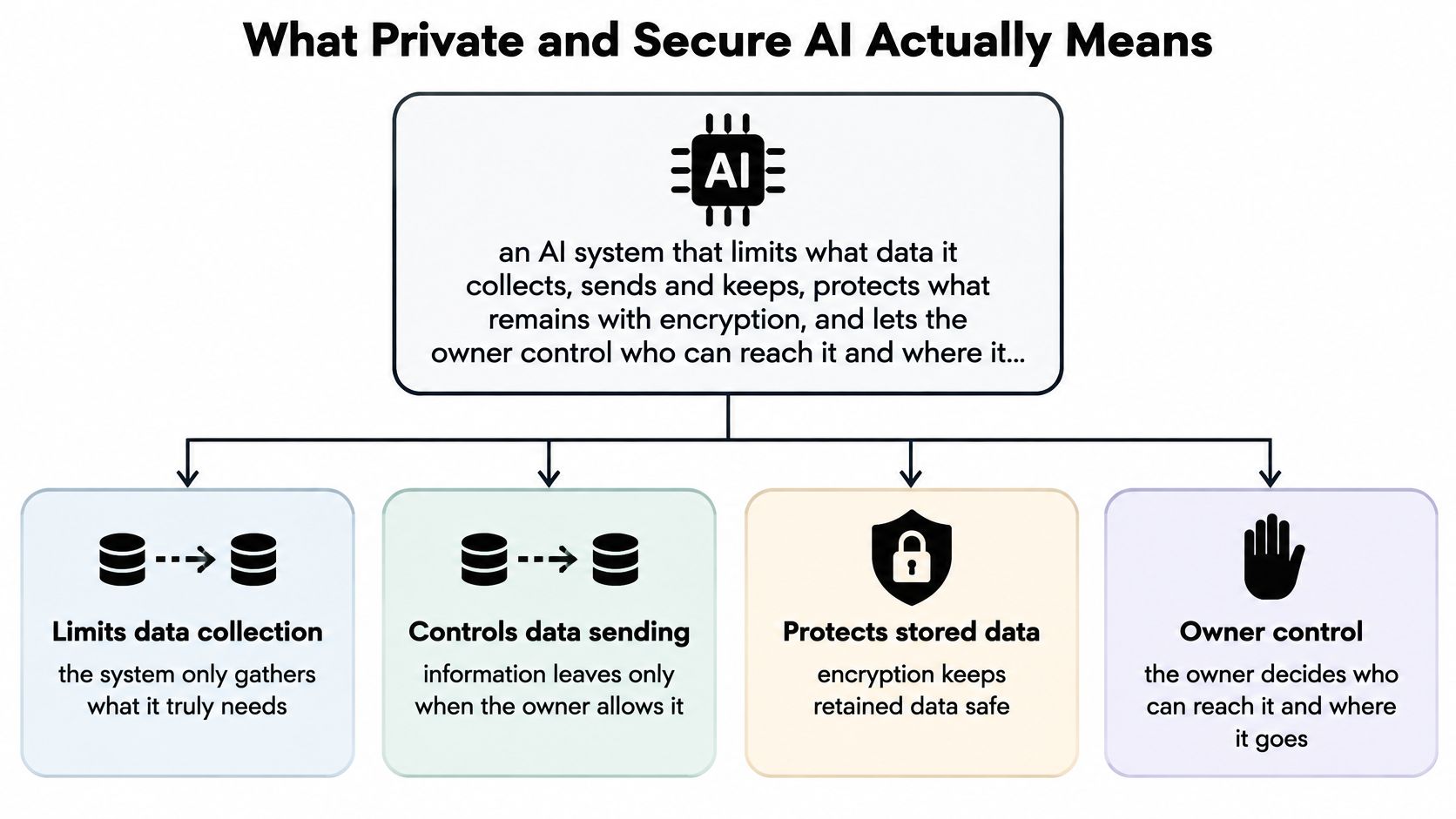
A private and secure AI system is an AI system that limits what data it collects, sends, and keeps, protects what remains with encryption, and lets the owner control who can reach it and where it runs.
People often treat those two adjectives as interchangeable, though they solve completely different problems. Private describes what happens to your data, including what gets collected, where it travels, how long it sticks around, and whether anyone reuses it. Secure describes whether unauthorized people or systems can get their hands on that data or tamper with it.
A tool can pass one test and fail the other. A cloud assistant locked behind hardware keys and strong network encryption might block outside attackers completely, yet still store your prompts to fine-tune future models. That tool is secure, not private. Conversely, a local-only app that never sends a single byte to the internet can sit on an unencrypted laptop where anyone with physical access can read every database file. That tool is private from the vendor, not secure.
The diagram below breaks that definition down into the four core safeguards that keep data bounded from collection through storage.
Five Controls Behind One Office Building
Think of an AI workspace like a well-run office building. Privacy rules govern the mailroom and the shredder: only approved envelopes leave the lobby, and scratch paper disappears as soon as a meeting ends. Security rules govern the badge readers and locked filing cabinets: an intern's keycard shouldn't open the boardroom safe, and the building's landlord decides where the vault sits.
Every reliable setup breaks those responsibilities into five distinct controls. Each one fails in a specific, predictable way when vendors cut corners.
| Control Pillar | What It Governs | Concrete Failure Mode |
|---|---|---|
| Data handling | What context the app gathers and sends per prompt | A request quietly bundles your entire file library instead of one selected page |
| Retention | How long prompts, excerpts, and logs survive after an answer | A server-side log keeps full prompt text long after you delete the chat |
| Encryption | How data stays unreadable on disks and across networks | An unencrypted laptop drive leaves local databases open to anyone who steals the machine |
| Access controls | Which files, tools, and recipients an assistant can reach | An assistant opens every shared folder a user can browse without role boundaries |
| Deployment controls | Where processing runs and who holds the keys | A single shared hosting tier offers no administrative boundaries or isolation options |
At Karya, every part of what we build ships with confidentiality switched on, and it has no off switch. Still, vendor architecture is only half of the picture. Permissions and downstream output sharing create the sharpest exposure in daily work, far more often than model training alone. Every one of the five pillars above turns into a concrete verification check you can run yourself before trusting any tool with sensitive work.
Retention and Deletion After Each Answer
Does clicking delete on a chat thread mean your data is gone? No. Removing a conversation from your sidebar only clears one visible view, while copies of your information can linger across six separate layers plus any third-party routing path along the way.
To verify what really disappears, you need to separate every artifact a single AI request generates. Each layer has a different technical lifecycle, so a blanket promise that chats aren't saved tells you almost nothing on its own.
Six Places Your Data Can Persist
Use the reference table below when reviewing a vendor's security documentation or filling out a procurement questionnaire. Vague answers like standard industry practice aren't enough; each row requires a specific commitment.
| Data item | Question to ask | Good answer |
|---|---|---|
| Prompts and questions | Is each request kept after the answer returns? | Zero data retention on model requests |
| Retrieved document excerpts | Are the passages sent to the model kept afterward? | Only the answer is returned; excerpts are not stored by the model provider |
| Embeddings and search indexes | Is the index stored, and where? | Stored locally, with a stated deletion method |
| Logs and audit trails | How long are logs kept, and do they contain content? | Stated period; logs record actions, not full content |
| Generated outputs | Are drafts and summaries kept, and who can open them? | Saved only where the user chooses, with access permissions |
| Training use | Is my data used to train any model? | No, with the policy stated in writing |
| Third-party routing | Does the request pass through an aggregator or unlisted endpoint? | Every endpoint named, each bound by the same zero-retention rule |
In plain terms, zero data retention means that once a language model finishes generating your answer, the model provider discards the request payload immediately and holds no copy on disk for review, debugging, or training. Every KChat model request requires zero data retention, denies data-collection endpoints, and refuses fallbacks outside the approved endpoint list. Because we host none of your KChat content, there's no cloud copy of anything you type or upload.
Careful buyers should push one step further whenever an AI tool routes requests through a third-party model router or aggregator. Ask who else touches the request in transit, whether the aggregator logs metadata or payloads, and whether the zero-retention commitment legally and technically follows the request to every single downstream endpoint. A strict rule at the front door means little if an unlisted fallback server logs prompts whenever the primary host gets busy.
Why Regulators Treat Retention Failures Seriously
Poor retention hygiene isn't merely a theoretical risk. Since the European Union's General Data Protection Regulation became enforceable on May 25, 2018, privacy authorities have had the power to levy penalties up to €20 million or 4% of a company's worldwide annual turnover, whichever is higher. Enforcement escalated rapidly once regulators began auditing real data practices.
According to the GDPR Fine Statistics compilation, recorded penalties rose from roughly €65.6 million across six decisions in 2019 and €128.8 million across nine decisions in 2020 to broader annual totals of about €1.08 billion in 2021 and €2.92 billion in 2022. Landmark rulings included Amazon's €746 million fine in 2021 and Meta's €1.2 billion penalty in 2023.
A privacy policy only tells you what a vendor intends to do on paper. Running a live deletion check is the only way to confirm your deleted prompt actually vanished from exports, search indexes, and logs.
When fines reach hundreds of millions or billions of euros, organizations can't rely on good intentions. You need demonstrable control over where personal and confidential data resides, how long each layer retains it, and how cleanly it disappears when a task finishes.
How Your Data Travels Through an AI Request
Reading about architecture in the abstract only gets you so far. Following one real request from keyboard to answer shows exactly where data sits at each moment and where leaks sneak in.
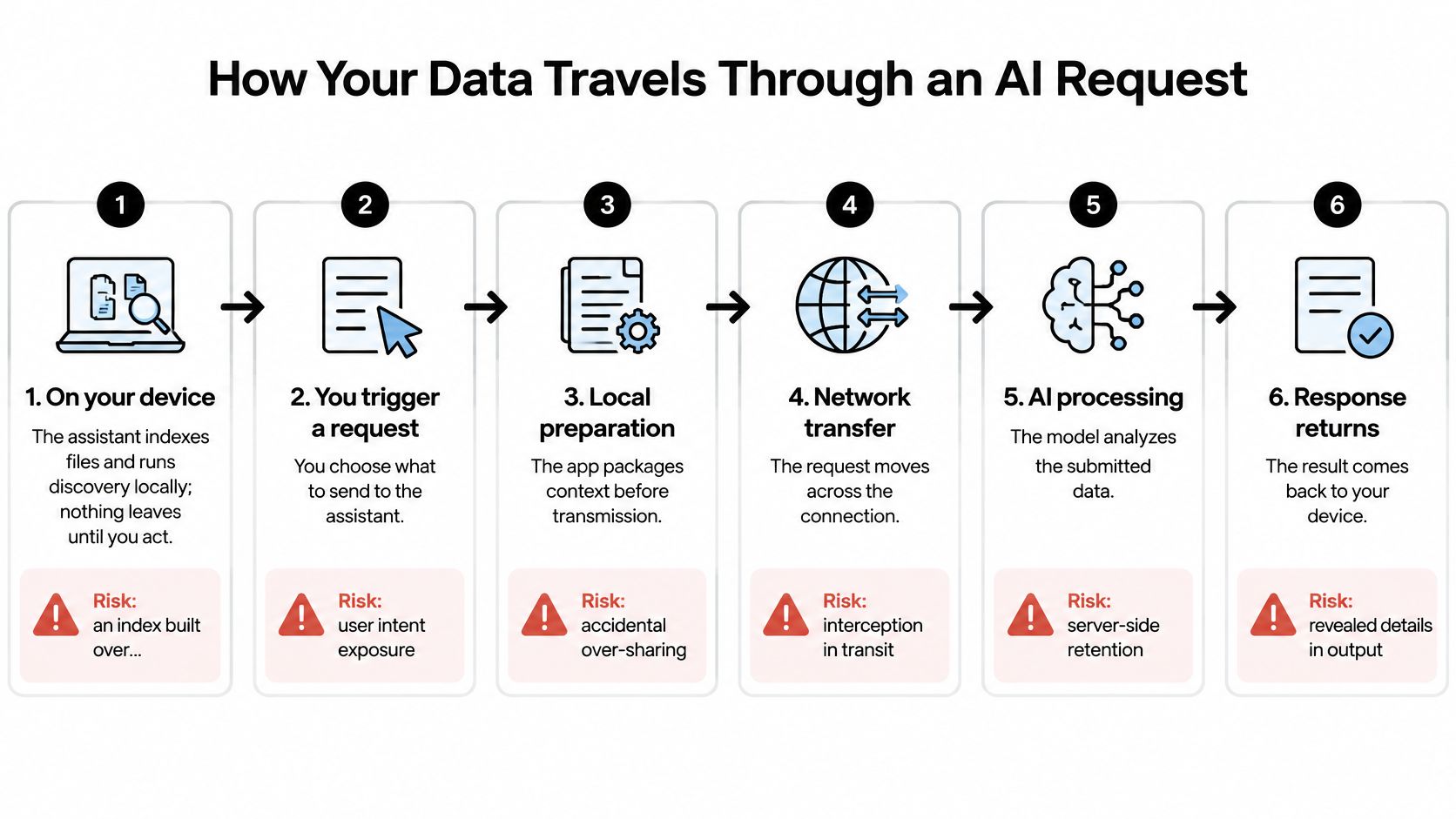
Say an operations manager opens a quarterly vendor budget spreadsheet on their laptop and asks an AI assistant to summarize three overdue line items. The process map below traces that single request across six stages and flags the privacy risk attached to each step.
Stages One to Three Preparing Data Locally
- On your device. Before you ask anything, a local-first assistant indexes files and runs discovery directly on your machine. Nothing leaves your laptop until you take action, and your files stay on your computer unless you choose to send them. The risk here is an overly greedy index that scans folders you never meant to include, such as personal tax records or archived HR reviews.
- Choosing what to share. You pick the specific file, page, or chat you want help with. In KChat, only the page you allow goes to the model, rather than pulling the whole workspace automatically. The risk is human habit: selecting an entire 40-tab workbook or a sprawling email thread when you only needed to share one table.
- Minimizing the payload. Before a single packet crosses the network, the software strips out irrelevant metadata and background history. A KChat request never contains your other chats, file library, name, or email address. The failure mode to watch for is a vendor that bundles your account identity, recent prompts, or open tabs into every payload by default.
Watching how those boundaries operate in practice makes it much easier to spot unnecessary data movement. The short walkthrough below shows how an AI request moves through a controlled pipeline from start to finish.
Stages Four to Six Transit, Routing, and Return
- Encrypted network transfer. Once minimized, the request leaves your device encrypted in transit, carrying only what the answer needs. If a vendor uses outdated transport protocols or passes unencrypted payloads between internal microservices after decrypting at the edge, your data becomes readable in flight.
- Endpoint routing and inference. Routing determines which physical server runs the language model on your text. KChat requests go through OpenRouter and may be handled only by the approved GLM-5.3-Flash endpoints at Modal, Baseten, DeepInfra, or Novita. If an assistant allows silent fallbacks to unlisted providers when traffic spikes, your prompt can land on a server that retains or inspects inputs.
- Response return. The model sends the summary back to your device along with source references pointing to the original cells or paragraphs. The final risk sits in logging: a poorly built tool might write the complete prompt, retrieved passages, and generated output into a persistent diagnostic log that stays readable for months.
Before adopting any AI tool for work files, put three direct path questions to the vendor in writing:
- Approved endpoints: Which exact infrastructure providers and model endpoints can receive a request, and what happens if one of them goes offline?
- Payload contents: What fields sit inside each outbound request, and does it strip out account names, email addresses, and unrelated chat history?
- Log visibility: Who can read request or error logs on the vendor's side, and do those logs capture message content or strictly operational events?
Encryption and Access Controls
Encryption is the safeguard vendors love to advertise first, yet buyers frequently overestimate what it does. Picture encryption as a sealed, tamper-evident envelope. While a courier carries your letter across town, nobody can peek inside; while the letter sits locked in a desk drawer overnight, a passerby can't read it. Once the envelope reaches an authorized recipient, however, encryption can't stop that person from opening it, photocopying it, or taping it to a public bulletin board.
What Encryption Covers and Where It Stops
A clear security review separates encryption in transit from encryption at rest, and checks who manages each layer.
- Data in transit: Requests sent through KChat are encrypted in transit between your laptop and the model endpoint, preventing outsiders on a shared Wi-Fi network or internet backbone from reading the payload.
- Data at rest: Local chats, files, and memory stay on your laptop's drive. KChat does not separately encrypt its local database and relies on your operating system's disk encryption (FileVault on macOS and BitLocker on supported Windows editions), with your sign-in stored in the system keychain. If disk encryption is turned off on a laptop, local files sit unprotected if the machine is lost or stolen.
Even when both layers are configured properly, encryption leaves three practical gaps open:
- Authorized oversharing: Encryption does nothing to stop an employee with valid credentials from summarizing confidential numbers and pasting them into an external Slack channel.
- Active processing in memory: A model must read your prompt in plaintext inside server memory to compute an answer, which is why endpoint trust and zero retention still matter.
- Accessible, unattended devices: Full-disk encryption protects a powered-off machine, not a logged-in laptop left open on a conference table.
Why Access Controls Matter More Than Training Promises
Many teams assume that once a vendor signs a no-training, zero-retention agreement, the hard privacy work is finished. Real breach data points in a very different direction. According to IBM's 2025 breach report announcement, which analyzed 600 organizations affected by breaches, 97% of AI-related breaches involved systems without proper access controls, while 63% of breached organizations lacked or were still developing AI governance policies.
Those numbers expose a harder question that training policies never touch: can an AI assistant guarantee it won't expose information a user is technically authorized to open, yet shouldn't combine, summarize, or forward?
Consider a realistic workplace scenario. Say a summer intern joins the finance team and inherits broad read permissions to an older shared department folder. Buried three subfolders deep is a spreadsheet of regional compensation bands. The intern points an assistant at the folder, asks for a clean summary of team salaries, and emails that digest to a wider project mailing list. Local processing did nothing wrong. Zero retention worked exactly as promised. The breach happened because inherited permissions were too wide and the generated output wasn't bound by the sensitivity of its source.
Preventing that failure requires tight authorization governance across files, emails, screens, and downstream outputs, built on the same foundations as disciplined document management. Five operational controls close the gap:
- Least-privilege access: Connect an assistant only to the exact folders, mailboxes, and tools a role needs, never to an entire company drive by default.
- Inherited permission audits: Clean up legacy shared drives before indexing them, because an AI assistant retrieves forgotten sensitive files far faster than a human browsing folders manually.
- Role changes and instant revocation: When someone moves from human resources to sales, or leaves the company, their AI workspace must lose access to prior folders immediately rather than waiting on cached indexes.
- Source-level citations: Requiring every answer to cite the exact underlying document lets reviewers spot immediately if a draft pulled numbers from a restricted file.
- Output sensitivity inheritance: At Karya, organizations can define exact access rules, data boundaries, and actions the system is never allowed to take, because a generated summary carries the same risk profile as the raw document behind it.
Access rule of thumb: A generated summary inherits the sensitivity of its most restricted source document. If the source file can't leave the legal folder, the summary shouldn't leave it either.
Why Private and Secure AI Matters Now
Weak controls stop feeling abstract the moment you look at the financial bill. In the IBM 2025 Cost of a Data Breach study, which analyzed 600 organizations across 17 industries that experienced breaches between March 2024 and February 2025, the global average cost of a breach reached $4.44 million. While that global figure dropped 9% from $4.88 million in 2024 thanks partly to quicker detection, the average U.S. breach cost climbed to a record $10.22 million.
Speed of detection still leaves a long window for damage. Even though organizations improved to their fastest pace in nine years, they still required an average of 241 days to identify and contain a breach. That is roughly eight months during which exposed records, credentials, or internal summaries can circulate undetected.
What the Breach Numbers Reveal About Everyday AI Use
Looking specifically at AI incidents inside that same study highlights where workplace controls break down:
- Active compromises are already happening: 13% of studied organizations reported breaches involving AI models or applications.
- Monitoring has serious blind spots: Another 8% didn't know whether they had experienced an AI-related compromise at all, pointing straight to missing audit logs and poor visibility into which tools touch company files.
- Unsanctioned apps drive exposure: 20% of organizations reported a breach connected to "shadow AI," meaning employees used unsanctioned AI tools without formal IT or security oversight.
Put those figures together and a clear pattern emerges. Costly incidents rarely happen because a frontier language model behaved unpredictably. They cluster around over-broad access, missing visibility into what employees are querying, and staff pasting confidential spreadsheets into unapproved consumer web apps because they lack a private and secure tool built for daily work.
Fixing those failures doesn't require waiting for next-generation cryptography. It requires testing how your chosen tool handles deletion, access boundaries, device protection, and audit logs before rolling it out across a team.
Verify a Private and Secure AI Tool Before You Trust It
Marketing pages make every AI product sound airtight. The NIST AI Risk Management Framework sets a much higher bar: it identifies anonymity, confidentiality, and user control as core privacy values, recommends data minimization alongside privacy-enhancing techniques such as de-identification and aggregation, and urges teams to validate claims with access-control tests, deletion tests, logging reviews, and red-team exercises rather than trusting vendor statements.
You don't need a massive security department to apply that mindset. Run the seven checks below in a test environment with dummy data before connecting real client or company files.
Seven Tests You Can Run in One Afternoon
- Collect written data-flow answers. Ask the vendor in writing to name every model endpoint, document its retention window, and confirm whether inputs ever enter training pipelines. Pass condition: named endpoints, explicit zero-retention terms, and a written no-training commitment.
- Run a canary deletion test. Create a throwaway note containing a unique string you'll never use elsewhere, such as
canary-quartz-8841. Ask the assistant to summarize it, then delete both the chat and the file. Search your chat history, run a full account export, and check local or admin logs. Pass condition: zero matches across history, exports, and logs. - Probe restricted access boundaries. Log in as a test user who has no permission to open a locked folder, then ask the assistant to summarize a document inside that folder by its exact file name. Pass condition: the tool refuses or reports no match without revealing the filename, metadata, or a single snippet.
- Inspect the activity logs. Perform three routine tasks (open a file, generate a summary, delete a thread) and pull the resulting audit trail. Pass condition: each event logs who acted and when, without storing raw prompt text or retrieved document paragraphs.
- Check local disk encryption and sign-in storage. On the test laptop, open macOS Privacy and Security settings to verify FileVault is on, or open Windows Device Encryption settings to confirm BitLocker is active, and verify sign-in credentials live in the operating system keychain rather than a plain-text config file. Pass condition: active full-disk encryption and keychain-backed authentication.
- Test action limits and instant revocation. Block an external action such as sending email, then remove the test user's role from a sensitive project folder and immediately ask the assistant about that folder again. Pass condition: blocked actions fail cleanly and revoked files vanish from results immediately.
- Check downstream output sensitivity. Generate a summary from a restricted test memo and try exporting or sharing that output with an unauthorized user or public folder. Pass condition: the summary inherits the source's permission limits or blocks unauthorized sharing.
Keep this quick pass-fail matrix beside you during vendor demos so no sales rep can steer you away from a failed check.
| Test Step | Warning Sign That Fails the Check | Clear Pass Condition |
|---|---|---|
| 1. Written data flow | Refuses to list sub-processors or uses vague retention windows | Named endpoints, zero retention, written no-training rule |
| 2. Canary deletion | Unique test phrase still appears in exports, caches, or search | Zero hits anywhere after deletion |
| 3. Restricted access | Summarizes restricted files or confirms they exist | Clean denial with no leaked filenames or snippets |
| 4. Activity logs | No audit trail exists, or logs capture full prompt contents | Action timestamps and user IDs logged without raw content |
| 5. Device check | Local database sits unencrypted on a drive without FileVault or BitLocker | Full-disk encryption active; tokens stored in OS keychain |
| 6. Action limits | Revoked folders stay searchable until a delayed re-index runs | Actions blocked on command; access revocation takes effect immediately |
| 7. Output check | Restricted summary shares freely to wider groups without warning | Generated output enforces or preserves source sensitivity rules |
Verification standard: If a vendor can't walk you through how to test deletion and access boundaries yourself, treat every privacy claim on their homepage as unverified.
Where to Start Your Review
If you're evaluating a tool for personal files on your laptop, start by reading the KChat security page, which was last reviewed in September 2026 and is updated whenever the product changes. For team evaluations, security questionnaires, or disclosure reports, email support@the-karya.com and a person at Karya will reply directly, including with options for private AI deployment if your organization works with confidential information.
Deployment Options and Where the AI Runs
Every verification check ultimately bumps into one architectural decision: where should AI processing run, and who holds the logs and encryption keys? Four hosting models cover almost every individual and enterprise use case, each trading convenience against direct control.
| Model | Where data is processed | Who controls logs and keys | Best fit | Main trade-off |
|---|---|---|---|---|
| Shared vendor cloud | Vendor infrastructure | Vendor, under contract terms | Fast start with low-sensitivity work | Least direct control over retention |
| Customer's own cloud account | Your cloud tenancy | Your organization | Regulated data that needs audit control | Requires cloud engineering skills |
| On-premises hardware | Your own data center | Your organization | Highest isolation requirements | Highest cost and maintenance burden |
| Device-first assistant with approved endpoints | Mainly your laptop; model calls go to listed endpoints | You control local files; the vendor controls the endpoint list | Personal and small-team file work | Only as strong as the device and the endpoint list |
Matching the Model to Your Data Sensitivity
Choosing the wrong tier either stalls adoption with unnecessary infrastructure costs or exposes regulated records you're legally obligated to isolate.
Say a five-person consulting firm drafts proposals, reviews vendor invoices, and organizes meeting notes on company laptops. Spinning up dedicated cloud GPUs or managing an on-premises server rack would waste budget and engineering hours. A device-first assistant with approved endpoints fits neatly: files stay on encrypted laptops, requests stay minimized, and zero-retention rules cover model calls without requiring an internal IT department.
Now picture a regional hospital or commercial bank processing patient records, loan underwriting files, or merger valuations under strict audit obligations. Those teams can't rely on shared vendor infrastructure. They generally need their own cloud tenancy or on-premises hardware, keeping logs, network boundaries, and encryption keys squarely inside internal security perimeters.
Making this deployment choice deliberately matters far more than picking the newest model release. In 2025, 79% of surveyed IT leaders said their organizations had experienced negative outcomes from sending corporate data to generative AI, according to Komprise's survey of 200 U.S. enterprise IT leaders. When leadership delays approving a sane deployment model, employees turn to unsanctioned web tools on their own and bypass every retention, encryption, and permission boundary you've built.
Before signing any enterprise agreement, ask each vendor which of the four hosting models it supports in production, and verify who owns the logs and keys at every hop. At Karya, for example, Enterprise AI can run in your own cloud, on your own rack, or in a setup aligned with your internal compliance rules, so your security posture matches the sensitivity of your actual work.
Karya builds confidential AI software designed around local-first control, strict zero-retention model requests, and explicit organizational access boundaries, whether you're organizing personal work files or deploying enterprise systems inside your own cloud or hardware. Explore how our private and secure architecture protects your files, workflows, and institutional knowledge by visiting Karya.